Monthly Update #5 – Life! and also Oh No! Not Again!

Well, I said I was going to do it around June 15th, but I wanted to write it now so I can talk about some important decisions I made today and what will happen from now on.

First of all: I’m really really busy for the rest of this month (that’s the reason of “Life!” at the tittle), I couldn’t work on games in my free time as much as I wanted to. I will try to work on it at least 25 minutes everyday and from 2 to 4 hours on weekends. Doing that I can also show that developing games is possible in a tight schedule, it will be a cool experience.

Midnight Journey

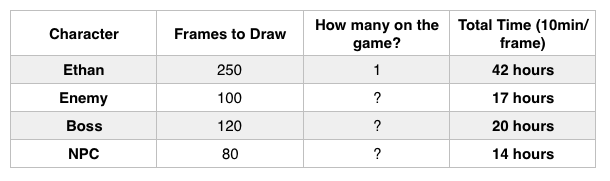
I was thinking on it, art, aesthetic, design document and those things. One thing led to another and I ended up calculating how many frames I would have to draw for each character and how much time it would take, the picture below is my results.

Screen Shot 2017-06-06 at 10.37.49 PM

I think that 10 minutes by frame is a fair ammount of time

As you can see, if I have my main character (Ethan) and only one boss, I would take around 60 hours just to do the art. Being able to work not even 10 hours weekly would make it a long long long road to finish this game.

Sounds like you are quitting Midnight Journey! No, I am not. It happened that once again I started a game out of my scope (that’s why “Oh No! Not Again!” on the tittle).

I had 2 objectives for Midnight Journey:

  1. Fully develop a game all by myself: design, programming, art, sound, marketing, etc…
  2. Develop a game that I would love to play and that would reflect who I am.

But it seems that they are two conflicting objectives, in fact, developing games I would love to play (by that I mean games that fits in my favourite styles and genres) would demand a lot of time and a big team. Not realizing it until now was my biggest mistake and the reason why I have 1 or 2 complete games on more than 3 years of game development.

What will I do now? Pretty Simple. I will write a Game Design Document for Midnight Journey, A BIG AND DETAILED GAME DESIGN DOCUMENT. The perfect blueprint of what I want it to be. With the GDD in hands I will have two options:

  1. Simplify it so it can fit my schedules. This way Midnight Journey wouldn’t fully accomplish the second objective anymore.
  2. Buy Assets/Hire Freelances. This way Midnight Journey wouldn’t accomplish the first objective anymore (and it would cost money, that sucks!)

What is more valuable? For me, Designing and Developing a game that I would love to play and that would reflect who I am is way more important. But anyway, I will finish the Game Design Document so I can make this decision.

BUT!

I won’t be only writing Game Design Documents! I will revisit old ideas and start developing them, specially really really simple mobile games that can be developed under 4 or 5 hours of work. Maybe one of them can be a game where I do everything and then I accomplish that first objective. I will also revisit some not so simple ideas (but more simple than Midnight Journey) and build some demos with cheap or free assets.

EXTRA: I’m actually thinking on developing a simple mobile game each month. I would choose a theme and maybe some restrictions and just try to play with the ideas and try to come up with a game. (Suggestions are welcome!)

P.S.: Probably you are thinking: “But you did nothing the whole month!” – And that’s not true! I did this cool snake game in javascript, which I do not guarantee to be free of bugs.

Next Update: Hmm… It will be sometime around 6th and 15th of July.

Monthly Update #4

What I did

After the last monthly udpate I did some more posts talking about Midnight Journey (Zelda Souls) and some decisions I made. On May 11th there was a “Software Showcase” at University and I decided that I wanted to show Midnight Journey there and did a small prototype that could show what I wanted for the game.

Unfornately, what I could do was about 50% of what I actually wanted to do. Anyway, it is easier to record a video showing the first playable version of Midnight Journey. So this is what I’ve done, the work of the whole month is in this video:


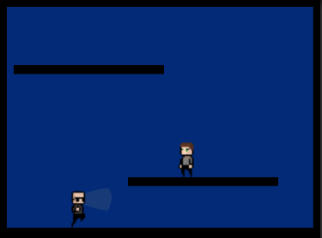
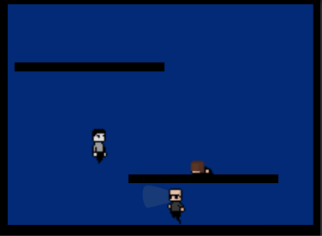
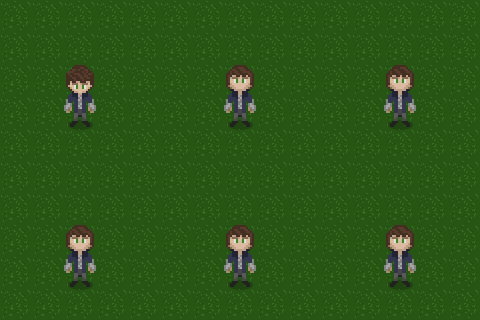
Basically it’s the programming for all the video, user interface, combat system with healing, cutscenes, character movement, drawing the main character and his animations, drawing an enemy and his animations, drawing a tileset for the background and composing a simple 8 bit music for the Title Screen (It can’t be heard on the video).

What to do next?

While programming/drawing this I decided to change some things…

Character: I’ve noticed that modern games similar to Midnight Journey usually uses 8 directions for movement and attack, and this is really a great idea. So I want to use 8 directions instead of 4. I had this idea when reading this post on medium that talks about animating top down 2D games on Unity, it is a really good resource.

Music: I don’t want it to be 8 bit anymore, I will try to go for a sound similar to the Playstation era (the first) using some synths from the 80s or 90s

Aesthetic: I want to think again the aesthetic that I want for Midnight Journey, while I liked the Ethan for this first view of the game it does not reflect exactly what I want for it.

What does it mean? I will do everything all over again. yay. But I think that how bigger games go.

Now, Really, What to do Next?

  1. I want to do this exact first view of the game again but with those changes, as I won’t have a “deadline” this time, I want to get it 100% right this time. I talk about exactly what I want at this other post
  2. Practice Pixel Art. A LOT. I want really smooth animations and some effects similar to particle effects. I have to improve on it so I can get the aesthetic I want.
  3. Search some VSTs that replicate the sounds of old synths. And try to mess with them.
  4. Program a Tile System for Unity. It was really hard to put those tiles together as they are in the video, even if it just a bunch of grass tiles, so I want to program my own tool so I can do it. There are some paid alternatives in Asset Store, but I want to avoid buying anything for this game.

Some thoughts I had while developing this

A thing that I’ve been thinking a lot lately is that I really want to work in the game industry, I don’t have a lot of opportunities where I live (kind of a small city in Brazil) but I’m trying to find one.

So I’m thinking if I really should be working in a game like Midnight Journey that would take like a year to turn into something (but it would be a game that I would be happier with the result) or if I should work on smaller games so I can publish them and have a bigger experience in fully developing games.

Or maybe both?? Midnight Journey is more of a game that I’m developing for myself (probably it isn’t a good idea the same person do programming/art/sound in a regular job) so I’m thinking if it really is a good experience and if it really is worth the time.

What I’m going towards at the moment is doing some casual games, try for a job or some ocasional freelancing and also keep working in Midnight Journey on my free time, as it is something that I do entirely for myself. Kinda confusing to be honest but I wanted to write it down here so I can think about it better.

Next Update:  I will try to do it around June 15th.

Midnight Journey

I’ve been working on it on my free time and things are starting to go forward, I have some time until May 5th, I did this gif and it gets a little bit of the essence of how this “Demo” will be:

ethan

Wish me Luck. I will post a monthly update on May 5th or 6th.

Assets for Midnight Journey

As I said before, I have to hurry to do some things for my game Midnight Journey (the one I was calling zelda souls). I’m just going to post here what I have to do in programming, art and sound.

Programming:

Mechanics to Implement:

  • Dodging in Combat
  • Charge Attack
  • Getting experience when diyng
  • Save Points
  • User Interface that can show information on the tutorial
  • Boss Fight
  • Transition from not fighting to in battle (When not in battle the character will not yield the sword, when in battle he will get it)

Music Composition:

  • Main Menu Music link
  • Dream Music – As the game starts inside a dream, I want to have a very calm and dreamy music for the game to start progressing. This one will play even on the first combats
  • Battle/Boss Music – This one will play on the tutorial’s boss, and has to be fast and give the sensation that you are going through something hard.

Pixel Art

This is will be the biggest list…

  • Main Character lying down and getting up
  • A Main Menu Screen, a MIDNIGHT JOURNEY write, with some styling, New Game and Options also in Pixel Art.
  • Main Character without sword (idle, run, attack, dodging, healing, getting the sword)
  • Main Character with sword (idle, run, fast attack, charge attack, dodging, healing, guarding and putting away the sword)
  • Grass and path (gray stones) tiles
  • A Statue with a removable sword
  • Enemy (idle, run, attack) – I want to be some kind of werewolf
  • The Boss (idle, run, attack, charge attack) – I want to be a person but with some werewolf resemblance.
  • Temple tiles
  • Main Character laying Down in his beedroom and opening his eyes.

I think that’s all I need to do… Let’s see how things goes!

Zelda Souls first Demonstration?

Where I study there will be a “Software Presentation” where students can showcase anything that they are developing or developed, I’m really thinking on taking Zelda Souls to it.

But for me to do it I have to at least have 5 playable minutes, a name and a small story.

I will really dedicate so I can do it, of course, the playable 5 minutes will be entirely with pixel art made by me and 2 or 3 musics also composed by me, I really think I can do it.

So… Zelda Souls, at least for the next month, is now called Midnight Journey! I’ve been thinking on having a story related to the night and/or dreams and I think that this is a suitable name, it can still change, but I hope I don’t need to.

PS: Some points that I don’t remember saying in any Zelda Souls posts, I want to try something called “unreliable narrator”, so maybe you will see me doing it in the posts when talking about the characters or the story. Also I want to present hidden information on the game, so the ones who pay more atention and look closely will be rewarded with more information about the world.

Main Character: The main character is called Ethan Wolstenholme, he has green eyes and light brown hair. He trained a little bit in sword combat but he is not very good at it, anyway he always carry a small dagger with him. I think he is not so smart but has a great mind, always helps the ones who need and is really strong, although he doesn’t look like a strong person.

The Playable 5 Minutes

Mechanics to Implement:

  • Dodging in Combat
  • Charge Attack
  • Getting experience when diyng
  • Save Points
  • User Interface that can show information on the tutorial
  • Boss Fight

Ideas: 

  • Cutscenes maybe can be described as Finite State Machines, each state will render some kind of animation and do some things.
  • Maybe the User Interface can also be described as a Finite State Machine, the state will tell if you are on battle, off battle or in a boss fight, the game render the interface according to this.
  • WTF I LOVE FINITE STATE MACHINES NOW

Main Menu: It will be a regular Main Menu with a beautiful art with the name “MIDNIGHT JOURNEY” and the options “New Game” and “Options”, maybe a “Credits” option. All HUD elements will be in Pixel Art and the music will be just a note progression on a scale that I will choose according to what sounds better to me, maybe I will add a melody on top of it.

New Game: 

Part 1 – Waking Up: After clicking New Game the screen goes black, and slowly you start seeing a scene, there is a random person laying down in the middle of the screen, in the grass. It’s really dark, it must be late at night, and yet, there is a strange feeling, it feels like this is not real, maybe this is just a Dream? (Note: This is the “tutorial” and it happens in Ethan’s dream). You can see something being written in the screen, dot by dot, really slowly you can just see a “…”, the person gets up and look around, he takes a step forward and look at the sky, Again, something in the screen “It is that day again? Oh…”.

Part 2 – Getting your Weapon: Finally you can control the character, as you walk forward the camera transitions and you can see a statue with a sword, you approach and a (?) mark appears on your character, it is a sign that you can interact with the statue, on the screen appears: “Looks like a sword…” (note: everything written in the screen will appear letter by letter really slowly) “Should I take it? > YES > No” – If the player choses YES you get the sword, if the player choses NO he will die when he finds the first monster lol, when he die the screen will show: “I should have gotten the sword…”

Part 2.5 – You Died: The first time you die you will se a message explaining that you get experience when you die, because we all learn with our mistakes and learning is the most valuable experience we can have.

Part 3 – Engaging in Combat: As you walk through the grass field you will find some really weak enemies that you can easily beat, it will teach you how to do a regular attack, a charge attack, heal yourself and dodge

Part 4 – Tutorial’s Boss: A really easy boss just so you can see how you a boss fight really is. It is guy with a strange weapon that seems to do some kind of trick, he is surrounded by death enemies and he himself doesn’t feel really great. You look closely to him and talk to him, he looks a little bit like a werewolf?

  • Ethan: “So… It’s happening again… Isn’t it?”
  • ??????: “Do you still have dreams?”
  • Ethan: “No.”
  • ??????: “Good.”
  • Ethan: “What about you?”
  • ??????: “It’s been a long time…”
  • Ethan: “…”
  • ?????? faces Ethan and wield his two swords: “… Sorry, it’s for your own good.”

And then the battle start and you should defeat him.

Part 5 – Wake me Up! – After beating the tutorial, the character will wake up in his bed, blink his eyes twice and the demo will be over.

I think this is everything that I will focus on for the next month starting tomorrow! I should hurry!

Decisions Decision

I’m quite disappointed with how much I worked on my projects until today. I barely touched any one of them, my classes are back, I have to figure out my schedules and plan what is the best time to work on my game projects and on my university related stuff.

Decisions on Zelda Souls

I said that I had to make decisions on art direction, name, user interface, sound/music, story and characters and some features. What I want is to create a similar feeling and experience to old NES or SNES games such as Zelda and Final Fantasy. Here we go:

Art Direction: 32×32 tiles with “chibi” characters, their heads will be about half of their size, so I can really capture identity for each character. I won’t use any color restrictions, although SNES already had a really broad color pallete.

Sound/Music: I think music is a big part of the experience those antique games created. I will go for an 8 bit or an 16 bit sound if 8 bit seems too limited for me (wich probably will be)

User Interface: Minimalist. As simple as possible, life bar and stamina bar on top left and equipments on bottom left

Experience to Create: I said that I wanted to recreate a nostalgic experience, but there’s more than that, I had the idea of using my fight against procrastination as my inspiration, my biggest goal with all these projects is to be self disciplined and achieve my goals, to get things done. As I go out of my comfort zone and fight with procrastination I thought that I should try to recreate this experience in the game.

Level Up Mechanic: You try to reach your goals and you will fail, with failure you learn, at some point you have knowledge enough to succeed, success is a sign that you have enough knowledge to accomplish what you want but it by itself won’t teach you anything. I really don’t know where it came from, it just came to my mind, that being said I thought of doing a different level up system, you gain experience by diying in the game, the lower you level when you finish the game, the best player you are! But players are just going to keep killing themselves! Sure… Sure… Let me introduce you to…

The Big Brother AI: Using Fuzzy Logic this AI will keep an eye on you through the whole game calculating the probability of you trying to cheat and level up by just killing yourself without making any effort to succeed. If it thinks you are trying to cheat it, your save game will be deleted and a beautiful message with a pixel art ancient guy will be showed!

Names: I’m starting to experiment with some names, I like “Midnight Journey”, “Journey to Midnight” and something related to the word “Moonlight”, I don’t have any part of the story yet but those names suggests something related to the night, that would be cool.

Battle System: I have a working battle system and I said I would tweak it, I changed my mind, the 80/20 rule makes sense here, I have 80% of my battle system with 20% of my time/effort, so those tweaks would be really slow and would demand a lot of effort. I don’t need a polished battle system right now. I need game design decisions, pixel art animations and tile maps so the game can turn into something.

I just have to go through story and characters now, but I promise I will continue to work on it and have a small playable demonstration by the start of May (until May 5th I hope).

Monthly Update #3

Introduction

This month probably was my busiest so far, and yet, the one that I worked the most on my free time, which is funny because my free time was way shorter than for the last couple months and I was a really good procrastinator, I’m glad that I’m able to work things out and make some progress!

I recorded two videos for this update just to try it, you don’t need to watch them to fully understand my progress since I write about it anyway, it is just a plus. If you watch please leave brutal and honest feedback!

Projects

Zelda Souls:

I have developed a simple battle system, I show it and talk a little bit about it in the video below, if you don’t want to watch, don’t worry, I will write the same thing I said in the video

What I have:

I did a simple battle system with the features:

  • Move up, down, to the left or right
  • Attack using a Stamina based System
  • Attack “feedback”
  • Kill the Enemy
  • Die to the Enemy
  • When you get closer to the enemy it starts following you
  • When you hit the enemy its life bar appears
  • If you run from the enemy it will stop following you and his life bar will disappear from the screen

For some technical details you can watch the video (there is no programming in the video).

When I have a more polished battle system I think I will record something explaining each component better and maybe even show some code to really explain how I did it.

Thoughts:

Text Game: I did a blog post about it, the thing is, I’ve coded the “core” to make any text game I want and I just need some time and planning to have a finished text game.

The purpose of this was to write a post on how to do it, and I’m having a bit of trouble thinking in a way to write it, I would have to explain some theory and code stuff. I just have to figure it out.

Rock Paper Scissors: … and a Wild New Project appears, one of these days I was doing some thinking and I was having some thoughts on Hearthstone Ranked being similar to a rock paper scissors game, if you face X and Y decks you will probably lose, if you face W and Z decks, you will win unless you make some huge misplays. So I came up with this idea of doing a Hearthstone themed Rock Paper Scissors Game, it is “Jade Reno Pirates”.

I recorded a video talking about it and showing it, feel free to watch it or to just read below:

I did the logic in 1 day, on the other day I did the Artificial “Intelligence” to play it and on the other I did the art for “Jade”, “Reno” and the “Pirate” (see them at the Pixel Art Section)

I want to finish it on the next few days and try to release it before April 6, that is when new Hearthstone Expansion comes out and the “Rock Paper Scissors” experience can change (hopefully).

Pixel Art

What I Learned: Pixel Art needs time, but it is not as difficult as I thought it would be, and it is really easy to correct your mistakes. The best way to study it (for me) is to take at least from 30 minutes to 1 hour everyday to watch and replicate a lesson or to draw something.

Here is what I’ve done:

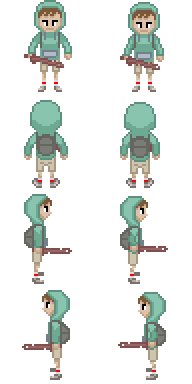
This is the character “Green Hood” and this is his Idle Animation!

greenhood

And these are the sprites for Jade Reno Pirates:

In order: SMOrc Face (not included in the game actually), Pirate Face, Jade Face and Reno Jackson, the other drawing is me trying to draw myself.

MEGOFACE.png

Game Music Composition

What I Learned: Music Composition is something that you really have to take your time and not rush it, the best way (at least for me) to do it, is to take 1 or 2 days of the week to work on it from 3 to 4 hours straight, working a bit everyday won’t be as effective.

This month I got back to learning a bit of Game Music Composition and I finished the 8 bit section on the Udemy Course I’m following!

I did this small piece of 14 seconds, it’s based on a kpop music, Dumb Dumb by Red Velvet, and it’s the intro of this music in 8 bit

I made this other piece, I composed some of it and used the same music as an inspiration for the main part.

I feel like the ending is a little bit “off”, but the FL Studio Demo Version does not allow opening saved projects, so I can’t fix it…

Goal Setting

This month I also learned about setting S.M.A.R.T goals, S.M.A.R.T stands for Specific, Measurable, Achievable, Relevant and Time-Bound. I would always tell myself “today I will work 1 hour in Pixel Art”, but didn’t quite have any motivation or purpose to do it, but following the rule, I would tell myself something like “Today I will watch these two online classes on Pixel Art and try to replicate what he do” or “Today I will get this character reference and try to draw his face”. And I think it works better for me, because I know exactly what I’m going to do when I start working in the subject. Cool.

Also, I’ve been with these courses on Udemy for quite some time already, Now I want to start applying what I learned, that means doing real art for my games and composing music for them.

Goals for Zelda Souls:

I’ve been with this project for 2 months now and I still haven’t decided everything so I can finish a Game Design Document, this can’t go on like that, I have to take the following decisions until the end of April:

  • Art Direction
  • Name
  • User Interface
  • Sound/Music
  • Story and Characters
  • Features/Mechanics (this one I have 80%)

Then I want to finish tweaking the battle system. I hope I can do it in the first week of April, and then I want to work on a Tile Map Creator, so I can easily create the maps for the game.

  • Goals for Other Projects: I want to finish “Jade Reno Pirates” until April 5th, I have to draw a background and UI elements and compose a simple music to play while you play, I should be able to do it. For the text game, I want to come with a good way for writing the post about it, giving that it is almost finished.
  • Goals for Pixel Art: As I said before, do a background and UI elements for the “Jade Reno Pirates” game. Finish the sections “TopDownTiles” and “Creating HUD Elements” for the course I bought on Udemy. Lastly, I want to have a spritesheet for the main character of Zelda Souls, not a definitive one, but one with the art direction I want, it should have idle, walking, attacking and rolling animation.
  • Goals for Game Music Composition: Complete the section “Character Music” or “Rpg Battle Theme”, compose a music for “Jade Reno Pirates” and compose a city theme for the initial city of Zelda Souls

… This was actually a really long update

Inverted Pyramid (?) in Game Development

Today I was reading this article (from a Brazilian gamedev website) and I was faced with the #2 tool that talked about an Inverted Pyramid.

I did some 5-minute-research on google about “Inverted Pyramid” and I didn’t find anything that could relate to this concept in game development, just for business decision making and news writing, and the purpose is a bit different to each one of them.

So what is the “Inverted Pyramid” for Game Development?

It is basically breaking your game into pieces, where the smaller piece is a finished game by itself, but not the actual game that you wanted to make. This smaller piece also can be called Minimum Viable Product (MVP).

After you have the Minimum Viable Product you start “iterating” over it, you add a feature that will result in another finished game, but maybe not quite the one you wanted to develop.

And you repeat the iterating process, you keep adding features and each feature will result in a game. This way, if you don’t like a feature or have to quit your project for some reason, you will have something finished and playable.

How do I do it? Just think in your game, now cut it to the essentials. Think of features that you can add that do not depend on other features. The MVP is your smaller triangle, each feature will make the triangle bigger and larger (and probably better! ).

Applying it to Zelda Souls

So, the point of writing all of this is to think how I can apply it to my biggest project at the moment, the Souls game with old Zelda aesthetics and top down view, which I’m currently naming “Zelda Souls”.

So I divided the game in some steps so I can develop my MVP and then start iterating and adding features.

And the steps are:

Core Game:

Minimum Viable Product (MVP): The Minimum Viable Product should be the Battle System, it’s also important being able to transition in and out of it.

Feature 0.5: Boss Battle System. Fighting Enemies is good, but fighting bosses is way cooler!!!

Feature 1: The first feature that I should  add to my game is a “Tile map Maker”. To help me create the maps for the character to run and battle!

Feature 2:  NPC’s and Dialog System. The character can run through the world and fight enemies, but a world without friendly people isn’t a world, the next step is to add NPC’s and a Dialog System so the player can chat with them.

Getting into Souls Games:

Feature 3: Consumable Items. With the MVP + F1 + F2 I have the game I want. So then I can start thinking on extras and features that could make it more interesting. Consumable Items to boost your strength, recover health and stamina, etc… Maybe I should even consider this in the battle system.

Feature 4: Equip-able Items. Making the character able to change his sword, shield and armor would be a nice plus!

Completely Optional:

Feature 5: Quests. Make NPC’s give some tasks to the player and reward him and he achieves it.

Last Words: I’ve never taken this approach of thinking my game as something simple (the MVP) with features and features on top of it, I’m feeling that with this in mind I will be able to take better decisions on what to add in the game for the future and what steps should I take to do it.


Assets Development

Going through what I would need for my game I started to plan some assets that I would need in it so I could see if I can find something similar in the internet to study them.

Most of them are paid and they aren’t really cheap, well, at least for a game developer that is a game developer in his free time and doesn’t have any money at all. So my idea is to write then here so I can have it saved what exactly I need.

I decided to try to develop them, at least a simple version that fullfil my needs, if they turn out to be good I’m planning on selling them on Unity Asset Store for a reasonable price, any money that I get with them will be used in the game or in my studies (courses, books, etc…) so I can make a better game!

I already said a lot, here are the assets:

  • Unity Tile System: Unity doesn’t deal with 2D tiles by default, so I need to develop my own, buy one or work the hard way, as I’m a programmar (that means I’m lazy) I want something to make my life easier, but I don’t want to pay. How it should be like: It needs to be a Unity plugin where you can draw your map in tiles using your sprites or prefabs, then you click in a “Generate!” button and it generates in the scene a GameObject with all the sprites/prefabs organized in the way you’ve drawn them. Bonus points if the plugin can deal with adding colliders to the tiles, dealing with the camera and being able to edit the map (I can save the map as a XML or JSON).
  • 2D Souls Combat System: I don’t know if this is a feature and if this is reusable content, but I will try to do the combat system as generic as possible so other people can use it in their projects (maybe even myself)
  • Dialog Engine: This one exists in the internet and are the most expensive ones, in my head it’s just a directed graph, shouldn’t be so hard… (oh boy I’ll regret saying this) How it should be like: I want it also to be a plugin so you can “draw” all your dialogues, something like a node editor, the graph will be saved in a XML or a JSON, you adjust the UI to have a dialogue part (like a Singleton GameObject) and in the NPC script ou just do a function call like DialogueManager.StartDialogue(ID), where ID is the id of the root node where the dialogue begins.
  • Inventory System: This one has for free in the internet, I will study them and see if suit my needs, if it doesn’t I come back here and edit this post.
  • Seller NPC: An NPC that… sells stuff? doesn’t look hard to do and maybe it is related to the Inventory System, maybe that’s the reason why there isn’t anyone posting something like this (I can add it to the inventory system)
  • RPG Pack: Everything above, but together, the purpose of this one is just to sell, if I get a nice game going maybe people would like to access it.

So this is the most important things that I will need to develop/buy/download for my game Zelda Souls, anything I do on them I will post here, thank you for reading!

Pixel Art progress

I’m following a course in Udemy that teaches Pixel Art and I recently started the RPG Style Characters session, I still have to go through the animations part, but this is was my result before some feedbacks:

rpgcharbefore

As you can see the image is a bit bigger than the space used by the character and I think the arm looks weird, this is the fixed version and saved in a bigger size:

rpgchar.png

What was adjusted and what I learned:

  • Canvas Size: to change the canvas size just click with the right mouse button on the image tab, click on “Canvas Size…” and there you can adjust it. For me the canvas size should be as small as possible.
  • Saving with 200%: I like the visuals on the second image better, even for a game, so to it I just save it as a regular .png file, then I open it in photoshop and change the image size to double the size, it’s important to change the resample to nearest neighbor.
  • Self cast shadow: This is really important in this perspective, the shadows help you have the idea of positioning, in the first image there is almost no shadow in the arms, this helps to make it feel weird, adding the shadow make it looks like the elbow is a bit bended and achieve the look that we usually want in this perspective.
  • Perspective: Seeing it in a top down perspective change a lot of things in the drawing process, the best is to look some references and think why something does not look nice (just like the arms on the first image), happens that the shoulders were also a bit short on the first image. On this perspective you see more of the shoulders, so I corrected it in the second image.

That’s it for this Pixel Art update! Next week I will be working more on Music Composition and maybe try the animations of this guy, I will post here again when I finish the animation, after that I will think of writing about or recording the whole process of me drawing a pixel art character.